

Have you been thinking about getting your home plugged into the Internet?
A large Johannesburg-based operator, Metrofibre Networx, is now expanding into KZN and is investing heavily in Ballito, Umhlanga and Pietermaritzburg.
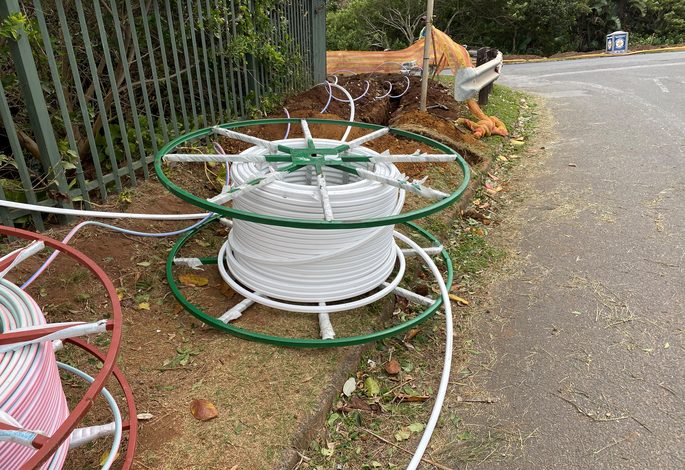
By now you have heard all the hype around fibre connectivity coming to Ballito and surrounds.
Your neighbours and family are all talking about getting ‘hooked up’.
Your teenage children are chomping at the bit to get ridiculously fast internet speeds and mega bandwidth for streaming and a world of indulgent binge entertainment and gaming.
Your internet connection is about to get a hefty shot of steroids. After you are fibred up, of course!
But, you need to get fibre installed first. As exciting as this whole new connected, lightning-fast world of internet utopia promises to be, there is nothing more frustrating than being met with geek-speak and patronising techno-jargon when all you really want is a plain and simple account of how it works.
In the past some fibre providers have tried to make a success in Ballito, but with the high number of holiday homes, the demand has not been very high.
A large Johannesburg-based operator, Metrofibre Networx, is now expanding into KZN and is investing heavily in Ballito, Umhlanga and Pietermaritzburg.

Metrofibre brand officer Liza Kok says the company serves 40 000 houses already and is preparing for a further 120 000.
“Fibre is a capital-intensive business and we invest in an area for a long term. We are currently in the top 5 fibre network operators – we own our network and it is run on an open access basis, meaning that other Internet service providers sell on our network.”
She outlined a step-by-step guide of the process, minus the parts that make it sound like a great big mission:
The first step is to establish whether your area/suburb has fibre infrastructure available.
If there were people digging up your pavements in the last few weeks or months, chances are your suburb has been approved for fibre installation by the municipality.
A simple Google search will also point you in the right direction – a search for ‘fibre coverage’ in your suburb will bring up a number of providers who are operating in your area.
Your infrastructure provider and your Internet Service Provider (ISP) may be the same company, but it doesn’t necessarily need to be.
Choose your Internet Service Provider (ISP):
The ISP provides your internet connectivity and bills you every month for the service, will install a Wi-Fi router in your home and get you connected to the internet.
Most Internet Service Providers (ISP) will have a list of ‘internet’ packages to choose from.
These are normally determined by the speed of the connection that you choose, ranging anywhere from 5 Megabytes per second (Mbps) through to 200 Mbps, with the price scaling up the higher the speed of the line.
Mbps is a measure of the speed at which data is transferred.
Most homes really don’t need huge bandwidth.
In South African terms, a 10 Mbps line is considered to be fast and will more than cope with what the average household would need.
It is also the minimum if you are planning on streaming movies or music from pay channels such as Netflix or Showmax.
If you plan on being a more intensive user (gaming or streaming TV for example) and have many people at home who will connect with multiple devices, either via phones, tablets, TV or laptop, it’s worth considering a 20 Mbps option or more.
You can also choose between a capped or an uncapped connection.
A capped connection will limit the amount of data you can use to a prescribed level.
An uncapped connection is a better option if you are planning on watching movies or downloading music.
Be aware that uncapped services still come with a Fair Use Policy (FUP) – which service providers implement as subscribers stretch the capacity of their networks by ‘throttling’ back the line speeds once certain usage thresholds are reached.
Be wary of basing your entire ISP decision on the first available connection date or price. Most Fibre To The House (FTTH) infrastructure providers have several Internet Service Providers (ISPs) that operate off their line and can provide you with many choices and price packages – this is what is termed an open access network.
Connecting fibre to your home: Most ISPs will provide you with a fibre router that is included in your package – in most instances the router remains the property of the ISP.
The router ultimately broadcasts your internet connection via radio wave, called Wi-Fi, to devices in your home such as your phone or your TV.
You can also connect a device such as your TV or laptop directly to your router using an Ethernet cable, which is recommended if you are planning on streaming movies or songs.
Video streaming is data-intensive and may require more bandwidth, causing other services and devices to ‘lag’ or buffer.
An Ethernet cable connection is always more reliable than the Wi-Fi signal from the same router and does not suffer from fluctuations.
Your ISP will also spend some time setting up your fibre router settings and home network, and especially important setting up a password to your router.
This allows you to control who connects to your fibre line.
It is then as simple as searching for the Wi-Fi network on your device – look for the name that your ISP created for your home network, select it from the list, enter the security password, and voila, you’re connected!
For more information visit metrofibre.co.za

Stay in the loop with The North Coast Courier on Facebook, X, Instagram & YouTube for the latest news.
Mobile users can join our WhatsApp Broadcast Service here, or if you’re on desktop, scan the QR code below.