How to apply for Smart ID card online
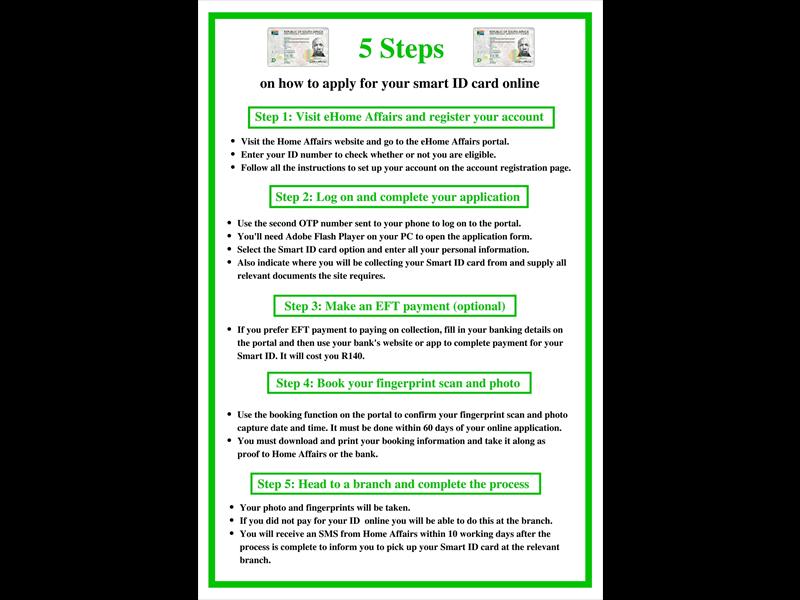
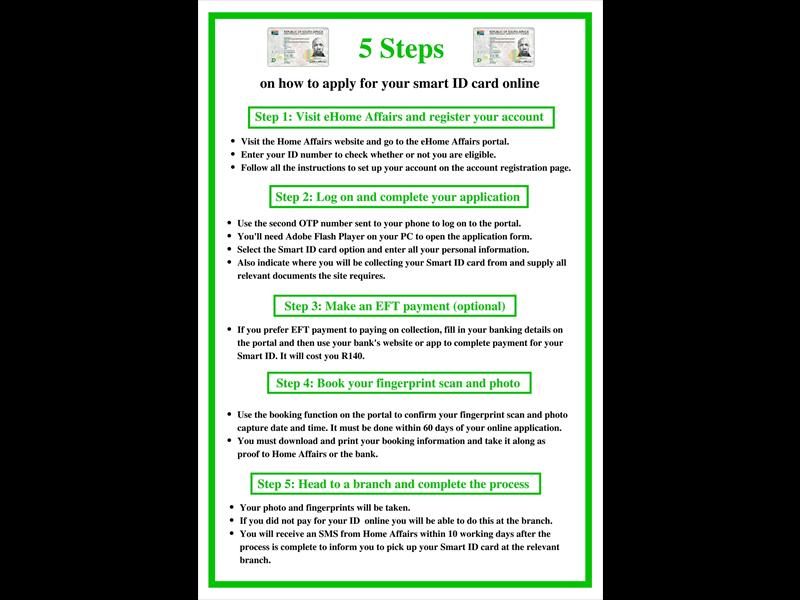
Consider these five easy steps when applying for your Smart ID online.
South Africans can now apply for a Smart ID or passport online, from the comfort of their own computer.
But you will need to book a session for you photo and fingerprint to be taken either at your local bank or Home Affairs office.
This will help you avoid frustratingly long queues and long hours shuffling on Home Affairs benches
President Jacob Zuma launched the eHome Affairs application portal at Gallagher estate, Midrand on Thursday.
The filling of and submission of forms and payment are all completed online and the Home Affairs at either ABSA, FNB, Standard Bank and Nedbank or the traditional home affairs office must attach your fingerprints and photo to your online application.
To get the registration process started, click here.
To apply for your new Smart ID card, follow these five easy steps on the eHome Affairs application portal:
Do you have more information about the story? Please send us an email to editorial@rekord.co.za or phone us on 083 625 4114.
For free breaking and community news, visit Rekord’s websites:
For more news and interesting articles, like Rekord on Facebook, follow us on Twitter or Instagram.
- We have exciting news! We’re offering a free alert to help you always be in the loop. Send an email with the word ‘Subscribe’ to breakingnews@rekord.co.za to receive your free daily breaking news update.