How to protect your child from adult content online
Take a look at the tips on how to protect your child from vulgar and inappropriate adult content on the internet.

Internet in South Africa is available almost everywhere on every device imaginable. Protecting your child against inappropriate adult content can be quite challenging, until now.
South Africa’s biggest mobile networks have created a simple way to block your children from viewing and be exposed to pornographic content.
Take a look at what you need to know here:
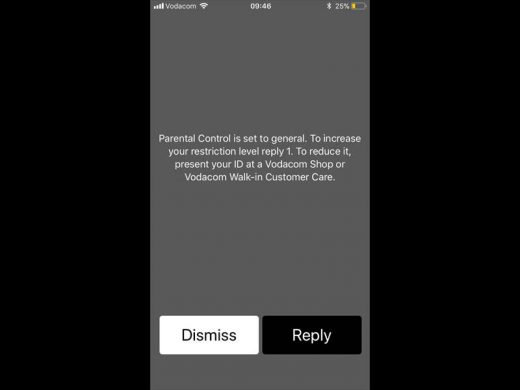
Vodacom:
Vodacom Parental Control is a protective measure to shield your children from being exposed to illegal and inappropriate adult content including gambling and violent or sexually-based material.
All contract and prepaid customers can bar access to adult content on a Vodacom cellphone by dialling *111*123# from the phone concerned.
This service is free and requires no activation fee.

MTN:
MTN has a free and easy way to prevent your child’s cellphone from having access to inappropriate adult content. You as a parent have to dial *101# and follow the steps to activate the service.
CellC and Telkom Mobile:
Neither CellC nor Telkom Mobile have implemented technical solutions to assist parents in protecting their children from inappropriate content online, but have indicated that such features will be available in the near future.



If you prefer to use an app to monitor your child’s online presence, then consider using one of the following apps:
Gallery Guardian:
As a parent, you’ll be able to pair your Gallery Guardian app on your device with your child’s using the special code provided after you’ve created an account.
You will then immediately get notified when a suspicious image has been detected on your child’s device.
Net Nanny
Net Nanny allows you as a parent to filter your child’s Internet access.
Net Nanny’s technology checks each web page your child visits, in real time, and will allow or block a webpage based on your preferences.
It provides monitoring features that are pre-set, which can be changed to suit the unique needs of each member of the family.
Spyzie
Spyzie allows you to monitor your child’s entire phone. Its features include:
– Tracking your child’s text messages.
– Browsing contacts.
– Checking the browser history.
– Tracking your child’s GPS location.
– Viewing your child’s photos.
– Viewing installed apps.
– Monitoring WhatsApp.
– Accessing calendar.
– Reading notes and reminders.
– Previewing videos.
Do you have more information about the story? Please send us an email to editorial@rekord.co.za or phone us on 083 625 4114.
For free breaking and community news, visit Rekord’s websites:
For more news and interesting articles, like Rekord on Facebook, follow us on Twitter or Instagram