

WhatsApp update – everything you need to know
Here is a quick guide on how to use the new feature
Popular messaging application, WhatsApp, last week rolled out its latest update, and many have been left with mixed emotions about it.
The update includes a Snapchat story-like feature, which allows users to update their status using pictures, GIF’s and videos.
Here is a quick guide on how to use the new feature:
Once your app is updated to the latest version, you will see a Status tab on the top bar. You’ll first see your own updates in the bar.
Below that, you can see your friends’ new updates and viewed updates.
You can add a status update by clicking the new update button on the bottom right corner which opens the camera.
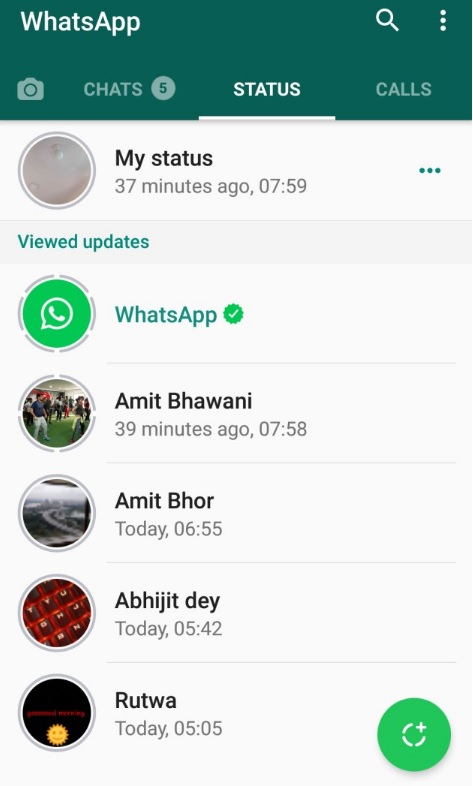
At the bottom, you will find all your recent photos, videos and GIFs in a strip as well, so you can either click a photo, hold for video or add an existing item.
Once added, you can tap on the status tab and see how many people have viewed your status, just as in Instagram. There are options to delete or forward the status as well.
Additionally, when you are viewing your friends’ updates you can swipe up and reply to them as well, similar to Instagram.
WhatsApp has introduced privacy settings as well to control who can see your status.
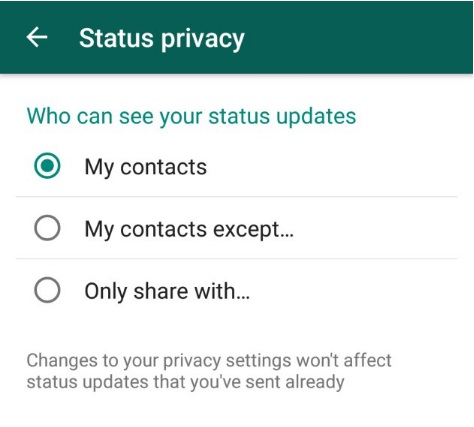
If you click on the three-dot menu on the top right, you’ll see an option called Status Privacy. Under this menu you can control status sharing.
Remember that all these updates will last for only 24 hours before disappearing.
>>> Meet the top players in the North Coast property industry. See our Property People feature.
>>> Looking for a church? Check out our Churches on the North Coast feature.
Do you want to receive news alerts via WhatsApp? Send us a WhatsApp message (not an sms) with your name and surname to 061 718 4438.
Please read our WhatsApp broadcast list disclaimer.
Join us on BBM at 59015786
Join the conversation on Facebook, Twitter and Instagram.
Stay in the loop with The North Coast Courier on Facebook, X, Instagram & YouTube for the latest news.
Mobile users can join our WhatsApp Broadcast Service here, or if you’re on desktop, scan the QR code below.